← Help center / Teams and players
Withdraw or disqualify a team
Updated 2 minute read
Once the draw is made, a team cannot be deleted, because its matches are part of the tournament. You can withdraw it or disqualify it instead.
On this page
Take a team out
- Open Teams.
- Press the ⋮ button on the team’s row.
- Choose Withdraw if they left, or Disqualify if they were removed.
- Confirm. You can choose to save their unplayed matches as forfeit wins for their opponents, or untick that to score those matches yourself.
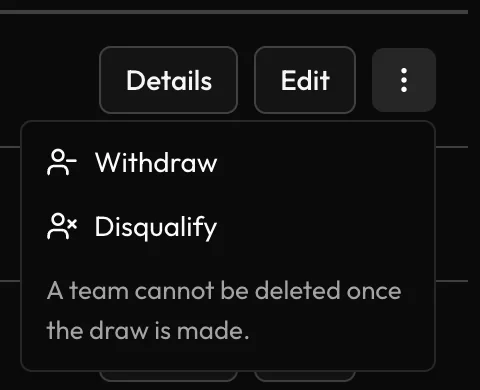
They get no new matches after that, and a tag shows next to their name everywhere.
Bring them back
Made a mistake? Open the same menu and choose Bring back in. They can get new matches again and the tag comes off.
Common questions
What is the difference between Withdraw and Disqualify?
Both stop the team getting new matches, and results they already have still count. The difference is the label shown next to their name everywhere: withdrawn or disqualified.
Can I delete a team instead?
Only before the draw. After that, the team is part of the matches, so you withdraw or disqualify it.
What happens to matches they already played?
They stay as they are. Only their unplayed matches change.