Run several tournaments as one event
Updated 2 minute read
An event holds tournaments that happen together, like the Boys, Girls and Open divisions of one cup. They share one public page and one link.
Make an event
- On your dashboard, press New Event.
- Give it a name, like Spring Cup 2026, and the dates if you know them.
- Press Create Event.
- On the event page, press New Tournament for each division.
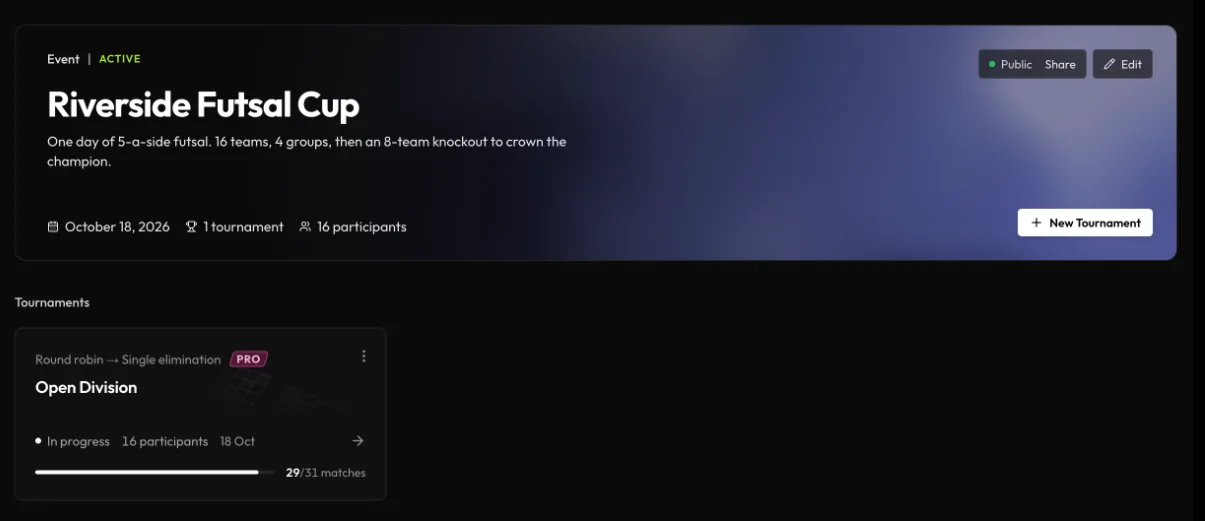
Already made a tournament on its own? Pick the event under Part of an event when you make the next one, and they sit together.
What an event gives you
- One public page that lists every tournament in it. One switch shares them all. New events start private.
- A banner and a description for the public page. Set them in Event Settings.
- Sponsors and visitor numbers on Pro. See add sponsors to your event.
- One payment. The $12 pass covers every tournament in the event.
An example
A school runs a sports day with three age groups. They make one event, Sports Day 2026, and three tournaments in it: Under 10, Under 12 and Under 14. Parents get one link and see all three. The school pays for the event once, not three times.
Event status
Each event has a status: Active, Draft, Completed or Archived. Change it with Edit on the event page. Your dashboard can filter events by status, so last season’s events stay out of the way.
Common questions
Do I pay for each tournament in an event?
No. The one event pass covers every tournament in that event, up to 64 teams or players each.
Can the tournaments in one event use different formats?
Yes. Each tournament has its own format and rules. One can be groups into a knockout and another can be Swiss.
Is a new event public straight away?
No. New events start private. Turn on the public link when you are ready.