Schedule matches across your courts
Updated 3 minute read
A schedule tells every team when to play and where. Tournamyx lays the matches out across your courts for you, and you can move any game afterwards.
On this page
Make the schedule
Draw the stage first, so the matches exist. Then open the stage and switch to the Schedule tab, or press Make a schedule on the Overview.
- Set Fields to the number of courts, pitches or tables you have.
- Pick a Date if you want one on the schedule. You can leave it empty.
- Set when the First slot starts.
- Set the Minutes per slot. Use match length plus a few minutes to change over. A 20 minute game needs a 25 or 30 minute slot.
- Press Generate schedule.
Each row is a slot and each column is a field. Red and blue show the two sides. A game with a green border has been scored.
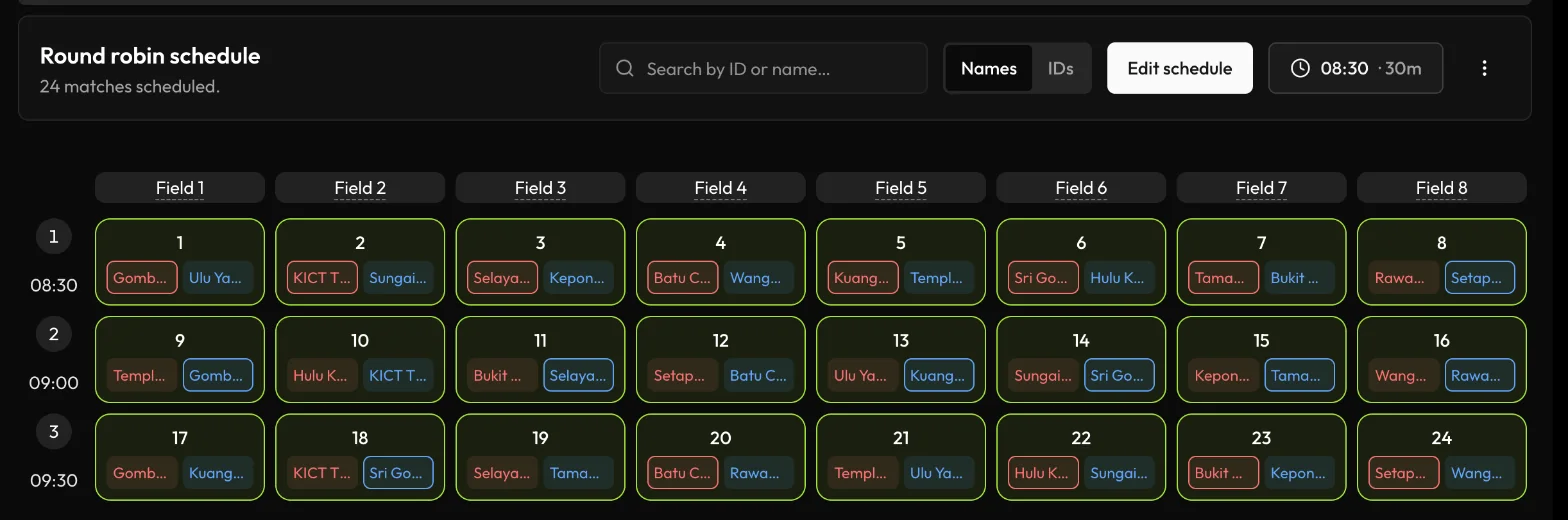
Click a field’s name to rename it, like Court A or Table 3. The new name shows everywhere, including the public page.
Move games by hand
- Press Edit schedule.
- Drag a game to a new spot. On a phone, tap the game, then tap where it should go.
- To move several at once, hold ⌘ (or Ctrl) and click them, or drag a box around them.
- Press Save schedule. Undo and Cancel are there if you change your mind.
Two more tools sit at the top of the editor. Paste a schedule takes a schedule you already made in a spreadsheet. Renumber games numbers the matches again in the new order.
Change times, add a break or a second day
The clock button above the grid, like 08:30 30m, changes the start time and slot length for the whole schedule. It also lets you add a second day or a break, like lunch, before any slot.
To change one slot, click the time next to it. You can move it to a new start time, or mark it as Running late and say by how many minutes. The box tells you which slots will move before you save.
Print the schedule and scoresheets
Press the ⋮ button above the grid. Export schedule to PDF gives you a schedule to pin up at the venue. Export scoresheets to PDF gives you a paper sheet for every match, for the referees.
How long your day will be
Count the slots, not just the matches. A round of 5 matches on 3 courts takes 2 slots, not 1.67, because a team cannot play twice at once. For a 10 team round robin, 9 rounds of 5 matches:
| Courts | Slots | At 30 minutes a slot |
|---|---|---|
| 2 | 27 | 13 hours 30 minutes |
| 3 | 18 | 9 hours |
| 4 | 18 | 9 hours |
| 5 | 9 | 4 hours 30 minutes |
Going from 3 courts to 4 saves nothing here. How to make a tournament schedule explains the maths.
Common questions
Can I schedule both stages?
Yes. Each stage has its own Schedule tab. Make the second stage’s schedule once it is drawn.
Can I change the schedule after games are played?
Yes. Edit schedule still works, and played games keep their scores.
Can I name the courts?
Yes. Click a field’s name above the grid to rename it, like Court A or Table 3.